# Silo Tenants with MinIO Operator
LLMS index: [llms.txt](/llms.txt)
---
A MinIO Tenant consists of a complete set of Kubernetes resources deployed within a namespace that support the MinIO Object Storage service.
This documentation assumes a [MinIO Operator installation](/operations/deployments/k8s-minio-operator/#deploy-minio-operator) on the target Kubernetes infrastructure.
## Prerequisites {#prerequisites}
Your Kubernetes infrastructure must meet the following prerequisites for deploying MinIO Tenants.
### MinIO Kubernetes Operator {#minio-kubernetes-operator}
The procedures on this page *require* a valid installation of the MinIO Kubernetes Operator and assume the local host has a matching Operator installation. They use `v7.1.1`, the final upstream release before the repository was archived, as a frozen compatibility baseline.
See [Deploy MinIO on Kubernetes](/operations/deployments/kubernetes/#deploy-operator-kubernetes) for complete documentation on deploying the MinIO Operator.
### Worker Nodes with Local Storage {#worker-nodes-with-local-storage}
MinIO **strongly recommends** deploying Tenants onto Kubernetes worker nodes with locally attached storage.
The Worker Nodes should meet MinIO’s [hardware checklist](/operations/checklists/hardware/#minio-hardware-checklist) for production environments.
Avoid colocating MinIO tenants on worker nodes that host other high-performance software. Where colocation is necessary, configure appropriate limits and constraints to guarantee MinIO access to the required compute and storage resources.
### Persistent Volumes {#persistent-volumes}
> [!NOTE]
> **Exclusive access to drives**
>
> MinIO **requires** *exclusive* access to the drives or volumes provided for object storage. No other processes, software, scripts, or persons should perform *any* actions directly on the drives or volumes provided to MinIO or the objects or files MinIO places on them.
>
> Unless directed by MinIO Engineering, do not use scripts or tools to directly modify, delete, or move any of the data shards, parity shards, or metadata files on the provided drives, including from one drive or node to another. Such operations are very likely to result in widespread corruption and data loss beyond MinIO’s ability to heal.
MinIO can typically use any Kubernetes [Persistent Volume (PV)](https://kubernetes.io/docs/concepts/storage/persistent-volumes) that supports the [ReadWriteOnce](https://kubernetes.io/docs/concepts/storage/persistent-volumes/#access-modes) access mode. MinIO’s consistency guarantees require the exclusive storage access that `ReadWriteOnce` provides. Additionally, MinIO recommends setting a reclaim policy of `Retain` for the PVC [StorageClass](https://kubernetes.io/docs/concepts/storage/storage-classes). Where possible, configure the Storage Class, CSI, or other provisioner underlying the PV to format volumes as XFS to ensure best performance.
For Kubernetes clusters where nodes have Direct Attached Storage, MinIO strongly recommends using the [DirectPV CSI driver](https://min.io/directpv?ref=docs). DirectPV provides a distributed persistent volume manager that can discover, format, mount, schedule, and monitor drives across Kubernetes nodes. DirectPV addresses the limitations of manually provisioning and monitoring [local persistent volumes](https://kubernetes.io/docs/concepts/storage/volumes/#local).
For Tenants deploying onto Amazon Elastic, Azure, or Google Kubernetes, select the tabs below for specific guidance on PV configuration:
**Amazon EKS**
MinIO Tenants on EKS must use the [EBS CSI Driver](https://github.com/kubernetes-sigs/aws-ebs-csi-driver) to provision the necessary underlying persistent volumes. MinIO strongly recommends using SSD-backed EBS volumes for best performance. MinIO strongly recommends deploying EBS-based PVs with the XFS filesystem. Create a StorageClass for the MinIO EBS PVs and set the `csi.storage.k8s.io/fstype` [parameter](https://github.com/kubernetes-sigs/aws-ebs-csi-driver/blob/master/docs/parameters.md) to `xfs` .
MinIO recommends the following [EBS volume types](https://github.com/kubernetes-sigs/aws-ebs-csi-driver/blob/master/docs/parameters.md):
- `io2` (Provisioned IOPS SSD) **Preferred**
- `io1` (Provisioned IOPS SSD)
- `gp3` (General Purpose SSD)
- `gp2` (General Purpose SSD)
For more information on EBS resources, see [EBS Volume Types](https://aws.amazon.com/ebs/volume-types/). For more information on StorageClass Parameters, see [StorageClass Parameters](https://github.com/kubernetes-sigs/aws-ebs-csi-driver/blob/master/docs/parameters.md).
**Google GKS**
MinIO Tenants on GKE should use the [Compute Engine Persistent Disk CSI Driver](https://cloud.google.com/kubernetes-engine/docs/how-to/persistent-volumes/gce-pd-csi-driver) to provision the necessary underlying persistent volumes.
MinIO recommends the following [GKE CSI Driver](https://cloud.google.com/kubernetes-engine/docs/how-to/persistent-volumes/gce-pd-csi-driver) storage classes:
- `standard-rwo` (Balanced Persistent SSD)
- `premium-rwo` (Performance Persistent SSD)
MinIO strongly recommends SSD-backed disk types for best performance. For more information on GKE disk types, see [Persistent Disks](https://cloud.google.com/compute/docs/disks).
**Azure AKS**
MinIO Tenants on AKS should use the [Azure Disks CSI driver](https://learn.microsoft.com/en-us/azure/aks/csi-storage-drivers) to provision the necessary underlying persistent volumes.
MinIO recommends the following [AKS CSI Driver](https://learn.microsoft.com/en-us/azure/aks/azure-disk-csi) storage classes:
- `managed-csi` (Standard SSD)
- `managed-csi-premium` (Premium SSD)
MinIO strongly recommends SSD-backed disk types for best performance. For more information on AKS disk types, see [Azure disk types](https://learn.microsoft.com/en-us/azure/virtual-machines/disks-types).
### Tenant Namespace {#tenant-namespace}
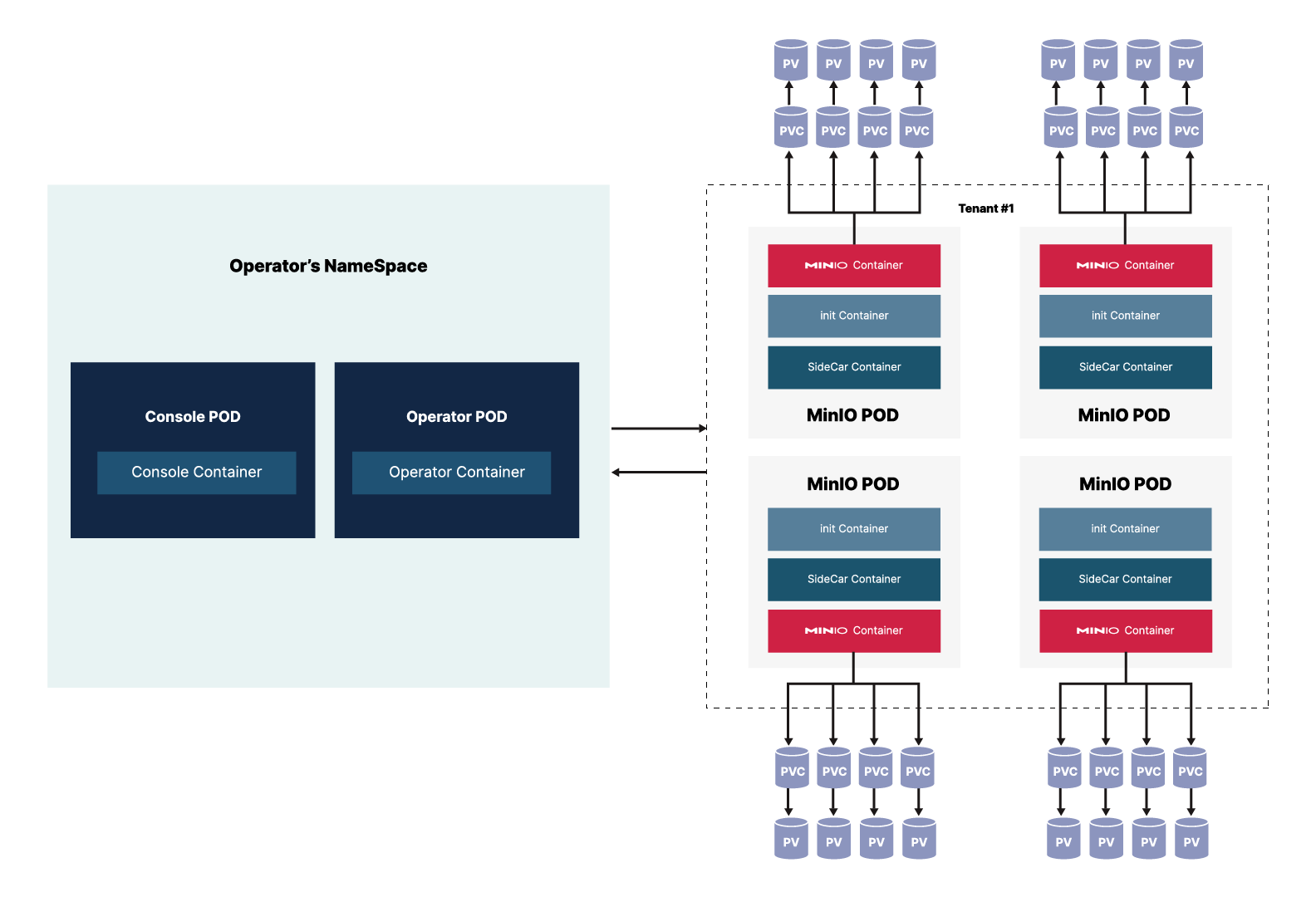
When you use the Operator to create a tenant, the tenant *must* have its own namespace. Within that namespace, the Operator generates the pods required by the tenant configuration.
Each Tenant pod runs three containers:
- MinIO Container that runs all of the standard MinIO functions, equivalent to basic MinIO installation on baremetal. This container stores and retrieves objects in the provided mount points (persistent volumes).
- InitContainer that only exists during the launch of the pod to manage configuration secrets during startup. Once startup completes, this container terminates.
- SideCar container that monitors configuration secrets for the tenant and updates them as they change. This container also monitors for root credentials and creates an error if it does not find root credentials.
Starting with v5.0.6, the MinIO Operator supports custom [init containers](https://kubernetes.io/docs/concepts/workloads/pods/init-containers) for additional pod initialization that may be required for your environment.
The tenant utilizes Persistent Volume Claims to talk to the Persistent Volumes that store the objects.