This is the multi-page printable view of this section. .
Bucket Replication
- 1: Requirements to Set Up Bucket Replication
- 2: Enable One-Way Server-Side Bucket Replication
- 3: Enable Two-Way Server-Side Bucket Replication
- 4: Enable Multi-Site Server-Side Bucket Replication
- 5: Resynchronize Bucket from Remote Replica
MinIO supports server-side and client-side replication of objects between source and destination buckets.
Server-Side Bucket Replication
Configure per-bucket rules for automatically synchronizing objects between MinIO deployments. The deployment where you configure the bucket replication rule acts as the “source” while the configured remote deployment acts as the “target”. MinIO applies rules as part of object write operations (e.g.
PUT) and automatically synchronizes new objects and object mutations, such as new object versions or changes to object metadata.MinIO server-side bucket replication only supports a MinIO cluster on an identical release for the remote replication target.
Client-side Bucket Replication
Use the command process to synchronize objects between buckets within the same S3-compatible cluster or between two independent S3-compatible clusters. Client-side replication using
mc mirrorsupports MinIO-to-S3 and similar replication configurations.
Bucket vs Site Replication
Bucket Replication is distinct from and mutually exclusive with site replication.
-
Bucket Replication synchronizes data at the bucket level, such as bucket prefix paths and objects.
You can configure bucket replication at any time, and the remote MinIO deployments may have pre-existing data on the replication target buckets.
-
Site Replication extends bucket replication to include IAM, security tokens, access keys, and bucket-level configurations.
Site replication is typically configured when initially deploying the MinIO peer sites. Only one site can hold any bucket or objects at the time of initial configuration.
Server-Side Bucket Replication
MinIO server-side bucket replication is an automatic bucket-level configuration that synchronizes objects between a source and destination bucket. MinIO server-side replication requires the source and destination bucket be two separate MinIO clusters running the same MinIO Server version.
For each write operation to the bucket, MinIO checks all configured replication rules for the bucket and applies the matching rule with highest configured priority. MinIO synchronizes new objects and object mutations, such as new object versions or changes to object metadata. This includes metadata operations such as enabling or modifying object locking or retention settings.
MinIO server-side bucket replication is functionally similar to Amazon S3 replication while adding the following MinIO-only features:
- Source and destination bucket names can match, supporting site-to-site use cases such as Splunk or Veeam BC/DR.
- Simplified implementation than S3 bucket replication configuration, removing the need to configure settings like AccessControlTranslation, Metrics, and SourceSelectionCriteria.
- Active-Active (Two-Way) replication of objects between source and destination buckets.
- Multi-Site replication of objects between three or more MinIO deployments
Resynchronization (Disaster Recovery)
Resynchronization primarily supports recovery after partial or total loss of the data on a MinIO deployment using a healthy deployment in the replica configuration. Use the mc replicate resync command completely resynchronize the remote target (mc admin bucket remote) using the specified source bucket.
The resynchronization process checks all objects in the source bucket against all configured replication rules that include existing object replication. For each object which matches a rule, the resynchronization process places the object into the replication queue regardless of the object’s current replication status.
MinIO skips synchronizing those objects whose remote copy exactly match the source, including object metadata. MinIO otherwise does not prioritize or modify the queue with regards to the existing contents of the target.
mc replicate resync operates at the bucket level and does not support prefix-level granularity. Initiating resynchronization on a large bucket may result in a significant increase in replication-related load and traffic. Use this command with caution and only when necessary.
For buckets with object transition (Tiering) configured, replication resynchronization restores objects in a non-transitioned state with no associated transition metadata. Any data previously transitioned to the remote storage is therefore permanently disconnected from the remote MinIO deployment. For tiering configurations which specify an explicit human-readable prefix as part of the remote configuration, you can safely purge the transitioned data in that prefix to avoid costs associated to the “lost” data.
Replication of Delete Operations
MinIO supports replicating delete operations, where MinIO synchronizes deleting specific object versions and new delete markers. Delete operation replication uses the same replication process as all other replication operations.
MinIO requires explicitly enabling versioned deletes and delete marker replication . Use the mc replicate add --replicate field to specify both or either delete and delete-marker to enable versioned deletes and delete marker replication respectively. To enable both, specify both strings using a comma separator delete,delete-marker.
For delete marker replication, MinIO begins the replication process after a delete operation creates the delete marker. MinIO uses the X-Minio-Replication-DeleteMarker-Status metadata field for tracking delete marker replication status. In active-active replication configurations, MinIO may produce duplicate delete markers if both clusters concurrently create a delete marker for an object or if one or both clusters were down before the replication event synchronized.
For replicating the deletion of a specific object version, MinIO marks the object version as PENDING until replication completes. Once the remote target deletes that object version, MinIO deletes the object on the source. While this process ensures near-synchronized version deletion, it may result in listing operations returning the object version after the initial delete operation. MinIO uses the X-Minio-Replication-Delete-Status for tracking delete version replication status.
MinIO only replicates explicit client-driven delete operations. MinIO does not replicate objects deleted from the application of lifecycle management expiration rules. For active-active configurations, set the same expiration rules on all of the replication buckets to ensure consistent application of object expiration.
If a delete operation removes the last object in a bucket prefix, MinIO recursively removes each empty part of the prefix up to the bucket root. MinIO only applies the recursive removal to prefixes created implicitly as part of object write operations - that is, the prefix was not created using an explicit directory creation command such as mc mb.
If a replication rule enables replication delete operations, the replication process also applies the implicit prefix trimming behavior on the destination MinIO cluster.
For example, consider a bucket photos with the following object prefixes:
photos/2021/january/myphoto.jpgphotos/2021/february/myotherphoto.jpgphotos/NYE21/NewYears.jpg
photos/NYE21 is the only prefix explicitly created using mc mb. All other prefixes were implicitly created as part of writing the object located at that prefix.
- A command removes
myphoto.jpg. MinIO automatically trims the empty/janauryprefix. - A command then removes the
myotherphoto.jpg. MinIO automatically trims the/februaryprefix and the now-empty/2021prefix. - A command removes the
NewYears.jpgobject. MinIO leaves the/NYE21prefix remains in place since it was explicitly created.
Replication of Existing Objects
MinIO by default replicates existing objects in the source bucket to the configured remote, similar to AWS: Replicating existing objects between S3 buckets without the overhead of contacting technical support.
MinIO marks all objects or object prefixes that satisfy the replication rules as eligible for synchronization to the remote cluster and bucket. MinIO only excludes those objects without a version ID, such as those objects written before enabling versioning on the bucket.
You can disable existing object replication while configuring or modifying the bucket replication rule. You must specify all desired replication features during creation or modification:
- For new replication rules, exclude
"existing-objects"from the list of replication features specified tomc replicate add --replicate. - For existing replication rules, remove
"existing-objects"from the list of existing replication features usingmc replicate update --replicate. The new rule replaces the previous rule.
Disabling existing object replication does not remove any objects already replicated to the remote bucket.
Synchronous vs Asynchronous Replication
MinIO supports specifying either asynchronous (default) or synchronous replication for a given remote target.
With asynchronous replication, MinIO completes the originating PUT operation before placing the object into a replication queue. The originating client may therefore see a successful PUT operation before the object is replicated. While this may result in stale or missing objects on the remote, it mitigates the risk of slow write operations due to replication load.
With synchronous replication, MinIO attempts to replicate the object prior to completing the originating PUT operation. MinIO returns a successful PUT operation whether or not the replication attempt succeeds. This reduces the risk of slow write operations at a possible cost of stale or missing objects on the remote location.
You must explicitly enable synchronous replication when configuring the remote target target using the mc admin bucket remote add command with the add flag.
Replication Internals
This section documents internal replication behavior and is not critical to using or implementing replication. This documentation is provided strictly for learning and educational purposes.
Replication Process
MinIO uses a replication queuing system with multiple concurrent replication workers operating on that queue. MinIO continuously works to replicate and remove objects from the queue while scanning for new unreplicated objects to add to the queue.
Changed: RELEASE.2022-07-18T17-49-40Z
MinIO queues failed replication operations and retries those operations up to three (3) times.
MinIO dequeues replication operations that fail to replicate after three attempts. The scanner can pick up those affected objects at a later time and requeue them for replication.
MinIO sets the X-Amz-Replication-Status metadata field according to the replication state of the object:
Replication State |
Description |
|---|---|
|
The object has not yet been replicated. MinIO applies this state
if the object meets one of the configured replication rules on the
bucket. MinIO continuously scans for For multi-site replication, objects remain
in the |
|
The object has successfully replicated to the remote cluster. |
|
The object failed to replicate to the remote cluster. MinIO continuously scans for |
|
The object is itself a replica from a remote source. |
The replication process generally has one of the following flows:
PENDING -> COMPLETEDPENDING -> FAILED -> COMPLETED
1 - Requirements to Set Up Bucket Replication
Bucket replication uses rules to synchronize the contents of a bucket on one MinIO deployment to a bucket on a remote MinIO deployment.
Replication can be done in any of the following ways:
- Active-Passive Eligible objects replicate from the source bucket to the remote bucket. Any changes on the remote bucket do not replicate back.
- Active-Active Changes to eligible objects of either bucket replicate to the other bucket in a two-way direction.
- Multi-Site Active-Active Changes to eligible objects on any bucket set up for bucket replication replicate to all of the other buckets.
Ensure you meet the following prerequisites before you set up any of these replication configurations.
Permissions Required for Setting Up Bucket Replication
Bucket replication requires specific permissions on the source and destination deployments to configure and enable replication rules.
The following policy provides permissions for configuring and enabling replication on a deployment.
- The
"EnableRemoteBucketConfiguration"statement grants permission for creating a remote target for supporting replication. - The
"EnableReplicationRuleConfiguration"statement grants permission for creating replication rules on a bucket. The"arn:aws:s3:::*resource applies the replication permissions to any bucket on the source deployment. You can restrict the user policy to specific buckets as-needed.
The following code creates a MinIO-managed user with the necessary policy. Replace the TARGET with the alias of the MinIO deployment on which you are configuring replication:
MinIO deployments configured for Active Directory/LDAP or OpenID Connect user management should instead create a dedicated access keys for bucket replication.
The following policy provides permissions for enabling synchronization of replicated data into the deployment.
- The
"EnableReplicationOnBucket"statement grants permission for a remote target to retrieve bucket-level configuration for supporting replication operations on all buckets in the MinIO deployment. To restrict the policy to specific buckets, specify those buckets as an element in theResourcearray similar to"arn:aws:s3:::bucketName". - The
"EnableReplicatingDataIntoBucket"statement grants permission for a remote target to synchronize data into any bucket in the MinIO deployment. To restrict the policy to specific buckets, specify those buckets as an element in theResourcearray similar to"arn:aws:s3:::bucketName/*".
The following code creates a MinIO-managed user with the necessary policy. Replace TARGET with the alias of the MinIO deployment on which you are configuring replication:
MinIO deployments configured for Active Directory/LDAP or OpenID Connect user management should instead create a dedicated access keys for bucket replication.
See mc admin user, mc admin user svcacct, and mc admin policy for more complete documentation on adding users, access keys, and policies to a MinIO deployment.
Matching Object Encryption Settings for Bucket Replication
MinIO supports replication of objects encrypted using SSE-KMS and SSE-S3:
- For objects encrypted using SSE-KMS, MinIO requires that the target bucket support SSE-KMS encryption of objects using the same key names used to encrypt objects on the source bucket.
- For objects encrypted using SSE-S3, MinIO requires that the target bucket also support SSE-S3 encryption of objects regardless of key name.
As part of the replication process, MinIO decrypts the object on the source bucket and transmits the unencrypted object over the network. The destination MinIO deployment then re-encrypts the object using the encryption settings from the target. MinIO therefore strongly recommends enabling TLS on both source and destination deployments to ensure the safety of objects during transmission.
MinIO does not support replicating client-side encrypted objects (SSE-C).
Bucket Replication Requires MinIO Deployments
MinIO server-side replication only works between MinIO deployments. Both the source and destination deployments must run MinIO Server with matching versions.
To configure replication between arbitrary S3-compatible services, use mc mirror.
Replication Requires Versioning
MinIO relies on the immutability protections provided by versioning to support replication and resynchronization.
Use mc version info to validate the versioning status of both the source and remote buckets. Use the mc version enable command to enable versioning as necessary.
If you exclude a prefix or folder from versioning within the source bucket, MinIO cannot replicate objects within that folder or prefix.
Matching Object Locking State With Bucket Replication
MinIO supports replicating objects held under WORM Locking. Both replication buckets must have object locking enabled for MinIO to replicate the locked object. For active-active configuration, MinIO recommends using the same retention rules on both buckets to ensure consistent behavior across sites.
You must enable object locking during bucket creation as per S3 behavior. You can then configure object retention rules at any time. Configure the necessary rules on the unhealthy target bucket prior to beginning this procedure.
2 - Enable One-Way Server-Side Bucket Replication
The procedure on this page creates a new bucket replication rule for one-way synchronization of objects from one MinIO bucket to another MinIO bucket. The buckets can be on the same MinIO deployment or on separate MinIO deployments.
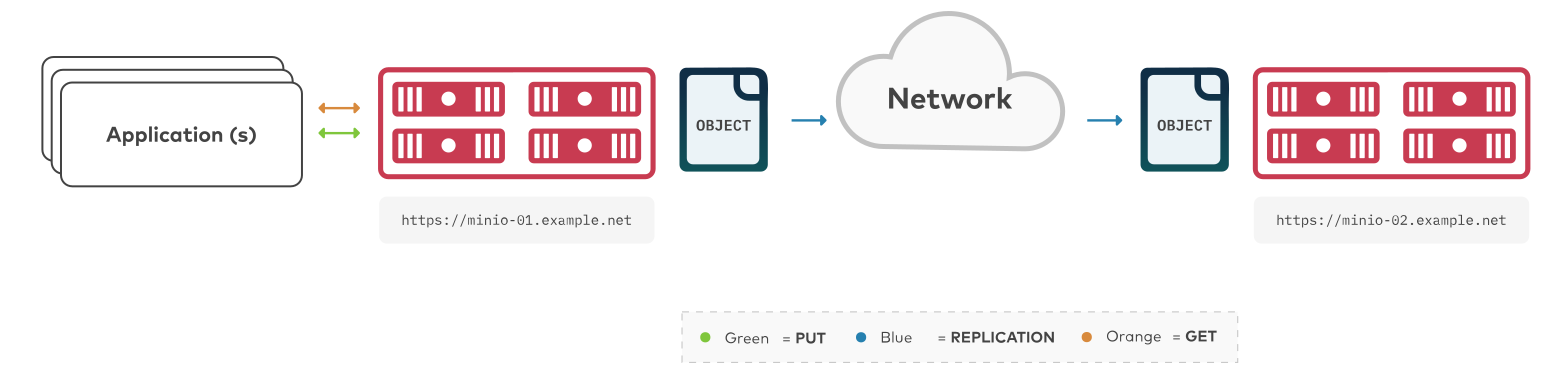
- To configure two-way “active-active” replication between MinIO buckets, see Enable Two-Way Server-Side Bucket Replication.
- To configure multi-site “active-active” replication between MinIO deployments, see Enable Multi-Site Server-Side Bucket Replication
Note
To configure replication between arbitrary S3-compatible services (not necessarily MinIO), use mc mirror.
Requirements
Replication requires all participating clusters meet the following requirements. This procedure assumes you have reviewed and validated those requirements.
For more details, see the Bucket Replication Requirements page.
Considerations
Click to expand any of the following:
MinIO supports automatically replicating existing objects in a bucket.
MinIO requires explicitly enabling replication of existing objects using the mc replicate add --replicate or mc replicate update --replicate and including the existing-objects replication feature flag. This procedure includes the required flags for enabling replication of existing objects.
MinIO supports replicating S3 DELETE operations onto the target bucket. Specifically, MinIO can replicate versioning Delete Markers and the deletion of specific versioned objects:
- For delete operations on an object, MinIO replication also creates the delete marker on the target bucket.
- For delete operations on versions of an object, MinIO replication also deletes those versions on the target bucket.
MinIO requires explicitly enabling replication of delete operations using the mc replicate add --replicate or mc replicate update --replicate. This procedure includes the required flags for enabling replication of delete operations and delete markers.
MinIO does not replicate delete operations resulting from the application of lifecycle management expiration rules.
See Replication of Delete Operations and Object Deletion for more complete documentation.
MinIO supports configuring multiple remote targets per bucket or bucket prefix. For example, you can configure a bucket to replicate data to two or more remote MinIO deployments, where one deployment is a 1:1 copy (replication of all operations including deletions) and another is a full historical record (replication of only non-destructive write operations).
This procedure documents one-way replication to a single remote MinIO deployment. You can repeat this tutorial to replicate a single bucket to multiple remote targets.
Procedure
Configure One-Way Bucket Replication Using the Command Line mc
This procedure uses the aliases SOURCE and REMOTE to reference each MinIO deployment being configured for replication. Replace these values with the appropriate alias for your target MinIO deployments.
This procedure assumes each alias corresponds to a user with the necessary replication permissions.
Changed: RELEASE.2022-12-24T15-21-38Z
mc replicate add automatically creates the necessary replication targets, removing the need for using the deprecated mc admin remote bucket add command. This procedure only documents the procedure as of that release.
1) Create a New Bucket Replication Rule
Use the mc replicate add command to add a new replication rule to each MinIO deployment.
-
Replace
ALIASwith the alias of the origin MinIO deployment. The name must match the bucket specified when creating the remote target in the previous step. -
Replace
BUCKETwith the name of the bucket to replicate from on the origin deployment. -
Replace the
--remote-bucketto specify the remote MinIO deployment and bucket to which theALIAS/BUCKETreplicates.The
USER:PASSWORDmust correspond to a user on the remote deployment with the necessary replication permissions.The
HOSTNAME:PORTmust resolve to a reachable MinIO instance on the remote deployment. TheBUCKETmust exist and otherwise meet all other replication requirements. -
The
--replicate "delete,delete-marker,existing-objects"flag enables the following replication features:See
mc replicate add --replicatefor more complete documentation. Omit any field to disable replication of that component.
Specify any other supported optional arguments for mc replicate add.
2) Validate the Replication Configuration
Use mc cp to copy a new object to the replicated bucket on one of the deployments.
Use mc ls to verify the object exists on the destination bucket:
See also
- Use the
mc replicate updatecommand to modify an existing replication rule. - Use the
mc replicate updatecommand with the--state "disable"flag to disable an existing replication rule. - Use the
mc replicate rmcommand to remove an existing replication rule.
3 - Enable Two-Way Server-Side Bucket Replication
The procedure on this page creates a new bucket replication rule for two-way “active-active” synchronization of objects between MinIO buckets.

- To configure replication between arbitrary S3-compatible services, use
mc mirror. - To configure one-way “active-passive” replication between MinIO clusters, see Enable One-Way Server-Side Bucket Replication.
- To configure multi-site “active-active” replication between MinIO clusters, see Enable Multi-Site Server-Side Bucket Replication.
This tutorial covers configuring Active-Active replication between two MinIO clusters. For a tutorial on multi-site replication between three or more MinIO clusters, see Enable Multi-Site Server-Side Bucket Replication.
Requirements
You must meet all of the basic requirements for bucket replication described in Bucket Replication Requirements.
In addition, to set up active-active bucket replication, you must meet the following additional requirements:
Access to Both Clusters
You must have network access and login credentials with required permissions to both deployment to set up active-active bucket replication.
You can access the deployments by installing mc and using the command line. Use the mc alias set command to create an alias for both MinIO deployments.
Alias creation requires specifying an access key for a user on the deployment. This user must have permission to create and manage users and policies on the deployment.
Specifically, ensure the user has at minimum:
admin:CreateUseradmin:ListUsersadmin:GetUseradmin:CreatePolicyadmin:GetPolicyadmin:AttachUserOrGroupPolicy
Considerations
MinIO supports customizing the replication configuration to enable or disable the following replication behaviors:
- Replication of delete operations
- Replication of delete markers
- Replication of existing objects
- Replication of metadata-only changes
When configuring replication rules for a bucket, ensure that both MinIO deployments participating in active-active replication use the same replication behaviors to ensure consistent and predictable synchronization of objects.
MinIO supports automatically replicating existing objects in a bucket.
MinIO requires explicitly enabling replication of existing objects using the mc replicate add --replicate or mc replicate update --replicate and including the existing-objects replication feature flag. This procedure includes the required flags for enabling replication of existing objects.
MinIO supports replicating delete operations onto the target bucket. Specifically, MinIO can replicate versioning Delete Markers and the deletion of specific versioned objects:
- For delete operations on an object, MinIO replication also creates the delete marker on the target bucket.
- For delete operations on versions of an object, MinIO replication also deletes those versions on the target bucket.
MinIO requires explicitly enabling replication of delete operations using the mc replicate add --replicate or mc replicate update --replicate. This procedure includes the required flags for enabling replication of delete operations and delete markers.
MinIO does not replicate delete operations resulting from the application of lifecycle management expiration rules. Configure matching expiration rules on both the source and destination bucket to ensure consistent application of object expiration.
See Replication of Delete Operations and Object Deletion for more complete documentation.
MinIO supports configuring multiple remote targets per bucket or bucket prefix. This enables configuring multi-site active-active replication between MinIO deployments.
This procedure covers active-active replication between two MinIO sites. You can repeat this procedure for each “pair” of MinIO deployments in the replication mesh. For a dedicated tutorial, see Enable Multi-Site Server-Side Bucket Replication.
Procedure
Configure Two-Way Bucket Replication Using the Command Line mc
This procedure creates two-way, active-active replication between two MinIO deployments.
This procedure assumes you have already defined an alias for each deployment as a user with the necessary replication permissions.
Changed: RELEASE.2022-12-24T15-21-38Z
mc replicate add automatically creates the necessary replication targets, removing the need for using the deprecated mc admin remote bucket add command. This procedure only documents the procedure as of that release.
1) Create a New Bucket Replication Rule on Each Deployment
Use the mc replicate add command to add a new replication rule to each MinIO deployment.
-
Replace
ALIASwith the alias of the origin MinIO deployment. The name must match the bucket specified when creating the remote target in the previous step. -
Replace
BUCKETwith the name of the bucket to replicate from on the origin deployment. -
Replace the
--remote-bucketto specify the remote MinIO deployment and bucket to which theALIAS/BUCKETreplicates.The
USER:PASSWORDmust correspond to a user on the remote deployment with the necessary replication permissions.The
HOSTNAME:PORTmust resolve to a reachable MinIO instance on the remote deployment. TheBUCKETmust exist and otherwise meet all other replication requirements. -
The
--replicate "delete,delete-marker,existing-objects"flag enables the following replication features:See
mc replicate add --replicatefor more complete documentation. Omit any field to disable replication of that component.
Specify any other supported optional arguments for mc replicate add.
Repeat this step on the other MinIO deployment. Change the ALIAS and --remote-bucket values to correspond to the first deployment.
You should have two replication rules configured at the conclusion of this step - one created on each deployment that points to the bucket on the other deployment. Use the mc replicate ls command to verify the created replication rules.
2) Validate the Replication Configuration
Use mc cp to copy a new object to the replicated bucket on one of the deployments.
Use mc ls to verify the object exists on the destination bucket:
Repeat this test by copying another object to the second deployment and verifying the object replicates to the first deployment.
Once both objects exist on both deployments, you have successfully set up two-way, active-active replication between MinIO buckets.
See also
- Use the
mc replicate updatecommand to modify an existing replication rule. - Use the
mc replicate updatecommand with the--state "disable"flag to disable an existing replication rule. - Use the
mc replicate rmcommand to remove an existing replication rule.
4 - Enable Multi-Site Server-Side Bucket Replication
The procedure on this page configures automatic server-side bucket replication between multiple MinIO deployments. Multi-Site Active-Active replication builds on the Enable Two-Way Server-Side Bucket Replication procedure with additional considerations required to ensure predictable replication behavior across all sites.
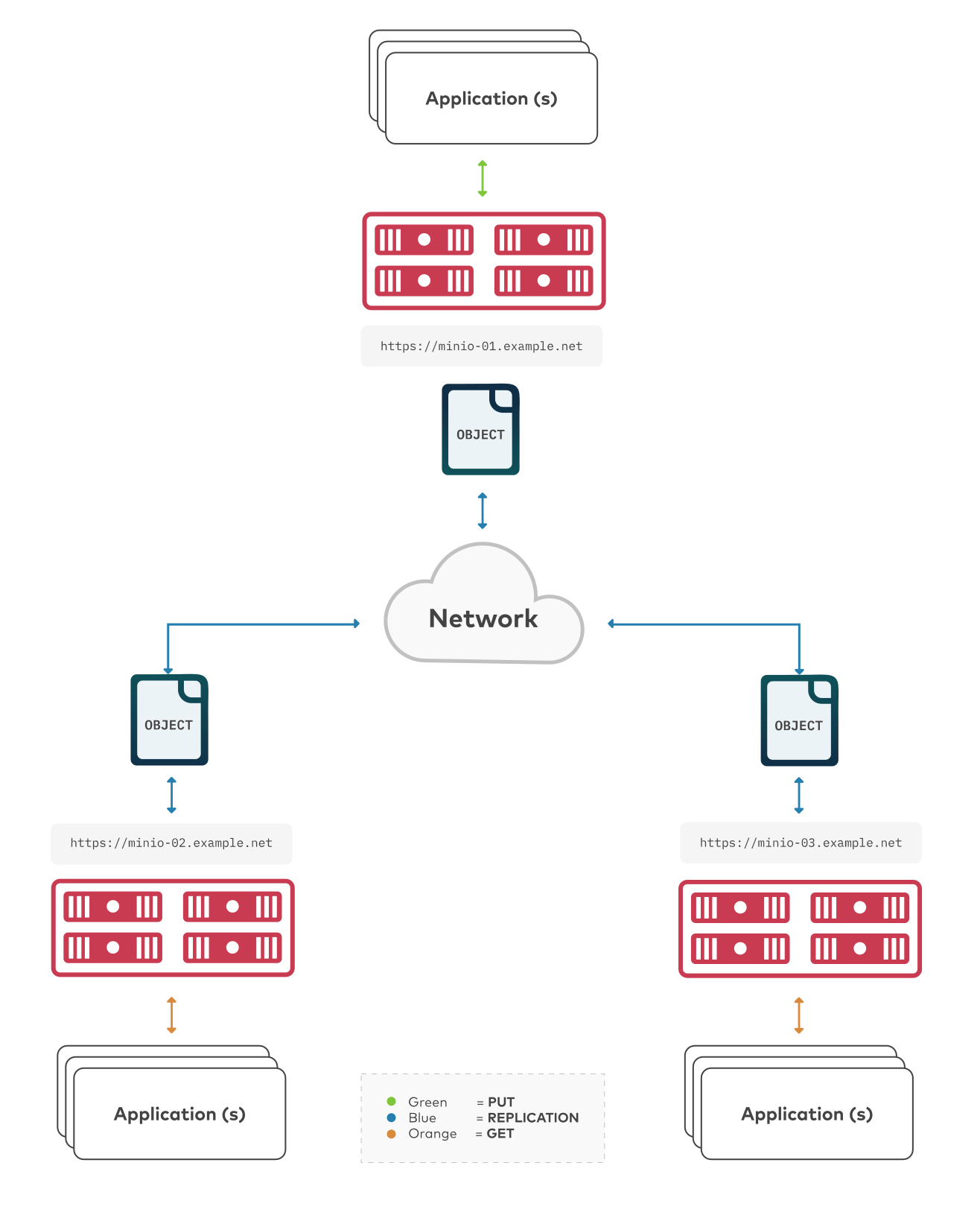
- To configure replication between arbitrary S3-compatible services, use
mc mirror. - To configure one-way “active-active” replication between two MinIO deployments, see Enable Two-Way Server-Side Bucket Replication.
- To configure one-way “active-passive” replication between MinIO deployments, see Enable One-Way Server-Side Bucket Replication.
Multi-Site Active-Active replication configurations can span multiple racks, datacenters, or geographic locations. Complexity of configuring and maintaining multi-site configurations generally increase with the number of sites and size of each site. Enterprises looking to implement multi-site replication should consider leveraging MinIO SUBNET support to access the expertise, planning, and engineering resources required for addressing that use case.
See also
- Use the
mc replicate updatecommand to modify an existing replication rule. - Use the
mc replicate updatecommand with the--state "disable"flag to disable an existing replication rule. - Use the
mc replicate rmcommand to remove an existing replication rule.
Requirements
You must meet all of the basic requirements for bucket replication described in Bucket Replication Requirements.
In addition, to create multi-site bucket replication set up, you must meet the following additional requirements:
Access to All Clusters
You must have network access and log in credentials with correct permissions to all deployments to set up multi-site active-active bucket replication.
You can access the deployments by installing mc and using the command line. Use the mc alias set command to create an alias for each MinIO deployment.
Alias creation requires specifying an access key for a user on the deployment. This user must have permission to create and manage users and policies on the deployment.
Specifically, ensure the user has at minimum:
admin:CreateUseradmin:ListUsersadmin:GetUseradmin:CreatePolicyadmin:GetPolicyadmin:AttachUserOrGroupPolicy
Considerations
Click to expand any of the following:
MinIO supports customizing the replication configuration to enable or disable the following replication behaviors:
- Replication of delete operations
- Replication of delete markers
- Replication of existing objects
- Replication of metadata-only changes
When configuring replication rules for a bucket, ensure that all MinIO deployments participating in multi-site replication use the same replication behaviors to ensure consistent and predictable synchronization of objects.
MinIO supports automatically replicating existing objects in a bucket.
MinIO requires explicitly enabling replication of existing objects using the mc replicate add --replicate or mc replicate update --replicate and including the existing-objects replication feature flag. This procedure includes the required flags for enabling replication of existing objects.
MinIO supports replicating delete operations onto the target bucket. Specifically, MinIO can replicate versioning Delete Markers and the deletion of specific versioned objects:
- For delete operations on an object, MinIO replication also creates the delete marker on the target bucket.
- For delete operations on versions of an object, MinIO replication also deletes those versions on the target bucket.
MinIO requires explicitly enabling replication of delete operations using the mc replicate add --replicate or mc replicate update --replicate. This procedure includes the required flags for enabling replication of delete operations and delete markers.
MinIO does not replicate delete operations resulting from the application of lifecycle management expiration rules. Configure matching expiration rules for the bucket on all replication sites to ensure consistent application of object expiration.
Procedure
This procedure requires repeating steps for each MinIO deployment participating in the multi-site replication configuration. Depending on the number of deployments, this procedure may require significant time and care in implementation. MinIO recommends reading through the procedure before attempting to implement the documented steps.
-
Configure Multi-Site Bucket Replication Using the Command Line
Configure Multi-Site Bucket Replication Using the Command Line mc
This procedure uses the placeholder ALIAS to reference the alias each MinIO deployment being configured for replication. Replace these values with the appropriate alias for each MinIO deployment.
This procedure assumes each alias corresponds to a user with the necessary replication permissions.
Changed: RELEASE.2022-12-24T15-21-38Z
mc replicate add automatically creates the necessary replication targets, removing the need for using the deprecated mc admin remote bucket add command. This procedure only documents the procedure as of that release.
1) Create New Bucket Replication Rules
Use the mc replicate add command to add a new replication rule to each MinIO deployment.
-
Replace
ALIASwith the alias of the origin MinIO deployment. The name must match the bucket specified when creating the remote target in the previous step. -
Replace
BUCKETwith the name of the bucket to replicate from on the origin deployment. -
Replace the
--remote-bucketto specify the remote MinIO deployment and bucket to which theALIAS/BUCKETreplicates.The
USER:PASSWORDmust correspond to a user on the remote deployment with the necessary replication permissions.The
HOSTNAME:PORTmust resolve to a reachable MinIO instance on the remote deployment. TheBUCKETmust exist and otherwise meet all other replication requirements. -
The
--replicate "delete,delete-marker,existing-objects"flag enables the following replication features:See
mc replicate add --replicatefor more complete documentation. Omit any field to disable replication of that component.
Specify any other supported optional arguments for mc replicate add.
Repeat these commands for each remote MinIO deployment participating in the multi-site replication configuration. For example, a multi-site replication configuration consisting of MinIO deployments minio1, minio2, and minio3 would require repeating this step on each deployment for each remote.
Specifically, in this scenario, perform this step twice on each deployment:
- On the
minio1deployment, once for a rule forminio2and again for a separate rule forminio3. - On the
minio2deployment, once for a rule forminio1and again for a separate rule forminio3. - On the
minio3deployment, once for a rule forminio1and again for a separate rule forminio2.
2) Validate the Replication Configuration
Use mc cp to copy a new object to the replicated bucket on one of the deployments.
Use mc ls to verify the object exists on the destination bucket:
Repeat this test on each deployment by copying a new unique file and checking that the file replicates to each of the other deployments.
You can also use mc stat to check the file to check the current replication stage of the object.
5 - Resynchronize Bucket from Remote Replica
The procedure on this page resynchronizes the contents of a MinIO bucket using a healthy replication remote. Resynchronization supports recovery after partial or total loss of data on a MinIO deployment in a replica configuration.
For example, consider a MinIO active-active replication configuration similar to the following:
Resynchronization allows using the healthy data on one of the participating MinIO deployments as the source for rebuilding the other deployment.
Resynchronization is a per-bucket process. You must repeat resynchronization for each bucket on the remote which suffered partial or total data loss.
Professional Support during BC/DR Operations
MinIO SUBNET users can log in and create a new issue related to resynchronization. Coordination with MinIO Engineering via SUBNET can ensure successful resynchronization and restoration of normal operations, including performance testing and health diagnostics.
Community users can seek support on the MinIO Community Slack. Community Support is best-effort only and has no SLAs around responsiveness.
Requirements
MinIO Deployments Must Be Online
Resynchronization requires both the source and target deployments be online and able to accept read and write operations. The source must have complete network connectivity to the remote.
The remote deployment may be “unhealthy” in that it has suffered partial or total data loss. Resynchronization addresses the data loss as long as both source and destination maintain connectivity.
Resynchronization Requires Existing Replication Configuration
Resynchronization requires the healthy source deployment have an existing replication configuration for the unhealthy target bucket. Additionally, resynchronization only applies to those replication rules created with the existing object replication option.
Use mc replicate ls to review the configured replication rules and targets for the healthy source bucket.
Replication Requires Matching Object Encryption Settings
MinIO supports replication of objects encrypted using SSE-KMS and SSE-S3:
- For objects encrypted using SSE-KMS, MinIO requires that the target bucket support SSE-KMS encryption of objects using the same key names used to encrypt objects on the source bucket.
- For objects encrypted using SSE-S3, MinIO requires that the target bucket also support SSE-S3 encryption of objects regardless of key name.
As part of the replication process, MinIO decrypts the object on the source bucket and transmits the unencrypted object over the network. The destination MinIO deployment then re-encrypts the object using the encryption settings from the target. MinIO therefore strongly recommends enabling TLS on both source and destination deployments to ensure the safety of objects during transmission.
MinIO does not support replicating client-side encrypted objects (SSE-C).
Replication Requires MinIO Deployments
MinIO server-side replication only works between MinIO deployments. Both the source and destination deployments must run MinIO Server with matching versions.
To configure replication between arbitrary S3-compatible services, use mc mirror.
Replication Requires Versioning
MinIO relies on the immutability protections provided by versioning to support replication and resynchronization.
Use mc version info to validate the versioning status of both the source and remote buckets. Use the mc version enable command to enable versioning as necessary.
If you exclude a prefix or folder from versioning within the source bucket, MinIO cannot replicate objects within that folder or prefix.
Replication Requires Matching Object Locking State
MinIO supports replicating objects held under WORM Locking. Both replication buckets must have object locking enabled for MinIO to replicate the locked object. For active-active configuration, MinIO recommends using the same retention rules on both buckets to ensure consistent behavior across sites.
You must enable object locking during bucket creation as per S3 behavior. You can then configure object retention rules at any time. Configure the necessary rules on the unhealthy target bucket prior to beginning this procedure.
Considerations
Resynchronization Requires Time
Resynchronization is a background processes that continually checks objects in the source MinIO bucket and copies them to the remote as-needed. The time required for replication to complete may vary depending on the number and size of objects, the throughput to the remote MinIO deployment, and the load on the source MinIO deployment. Total time for completion is generally not predictable due to these variables.
MinIO recommends configuring load balancers or proxies to direct traffic only to the healthy cluster until synchronization completes. The following commands can provide insight into the resynchronization status:
mc replicate resync statuson the source to track the resynchronization progress.mc replicate statuson the source and remote to track normal replication data.- Run
mc ls -r --versions ALIAS/BUCKET | wc -lagainst both source and remote to validate the total number of objects and object versions on each.
Resynchronize Objects after Data Loss
This procedure uses an existing MinIO replication configuration to restore missing data to one of the MinIO deployments participating in that configuration. Specifically, a healthy MinIO deployment (the SOURCE) synchronizes it’s existing data to the unhealthy MinIO deployment (the TARGET).
This procedure assumes an existing alias for the SOURCE that has the necessary permissions for configuring replication.
You can repeat this procedure for each bucket that requires resynchronization. You can have no more than one replication job running per bucket.
1) List the Configured Replication Targets on the Healthy Source
Run the mc replicate ls command to list the configured remote targets on the healthy SOURCE deployment for the BUCKET that requires resynchronization.
- Replace
SOURCEwith the alias of the source MinIO deployment. - Replace
BUCKETwith the name of the bucket to use as the source for resynchronization.
The output resembles the following:
Each document in the output represents one configured replication rule. The Destination.Bucket field specifies the ARN for a given rule on the bucket. Identify the correct ARN for the Bucket from which you want to resynchronize objects.
2) Start the Resynchronization Procedure
Run the mc replicate resync start command to begin the resynchronization process:
- Replace the
--remote-bucketvalue with the ARN of the unhealthyBUCKETon theTARGETMinIO deployment. - Replaced
SOURCEwith the alias of the source MinIO deployment. - Replace the
BUCKETwith the name of the bucket on the healthySOURCEMinIO deployment.
The command returns a resynchronization job ID indicating that the process has begun.
3) Monitor Resynchronization
Use the mc replicate resync status command on the source deployment to track the received replication data:
The output resembles the following:
The Status updates to Completed once the resynchronization process completes.
4) Next Steps
- If the
TARGETbucket damage extends to replication rules, you must recreate those rules to match the previous replication configuration. See Enable Two-Way Server-Side Bucket Replication for additional guidance. - Perform basic validation that all buckets in the replication configuration show similar results for commands such as
mc lsandmc stat. - After restoring any replication rules and verifying replication between sites, you can configure the reverse proxy, load balancer, or other network control plane managing connections to resume sending traffic to the resynchronized deployment.